Fundamental SVG Elements
Below you will find explanations and examples of some essential SVG elements.
Table of Contents
1. <svg> Container
The main container for SVG graphics. Every SVG element must be inside it.
<svg width="200" height="200">
  <!-- Graphic elements go here -->
</svg>
More information: W3Schools — SVG Introduction
2. Rectangles <rect>
Allows you to draw rectangles inside an SVG.
<svg width="200" height="200">
  <rect x="10" y="10" width="100" height="50" fill="blue"></rect>
</svg>

More information: W3Schools — SVG Rectangles
3. Circles <circle>
Draws a circle using coordinates and radius.
<svg width="200" height="200">
  <circle cx="50" cy="50" r="40" fill="red"></circle>
</svg>

More information: W3Schools — SVG Circles
4. Paths <path>
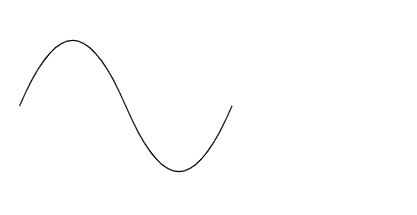
Used to draw complex shapes by defining a route with commands.
<svg width="200" height="200">
  <path d="M10 80 C 40 10, 65 10, 95 80 S 150 150, 180 80" stroke="black" fill="transparent"></path>
</svg>
More information: W3Schools — SVG Paths
5. Text <text>
Allows you to add text inside an SVG graphic.
<svg width="200" height="200">
  <text x="10" y="50" font-family="Arial" font-size="20" fill="green">Hello SVG</text>
</svg>

More information: W3Schools — SVG Text